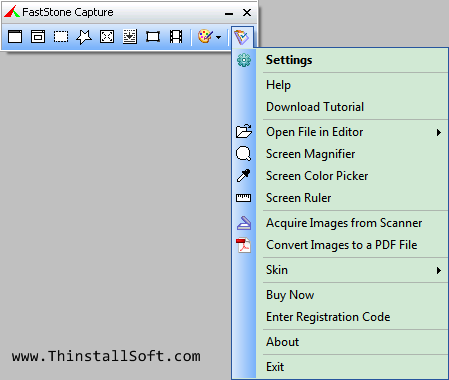
FastStone Capture is a tiny screen capture tool with powerful features. With FastStone Capture, you could easily create screenshot and annotate, then save as BMP, GIF, JPEG, PCX, PNG, TGA, TIFF, PDF.
It supports various capture modes including Active Windows, Windows / Object, Rectangular Region, Freehand Region, Full Screen, Scrolling Window, Fixed Region, Repeat Last Capture and Import from clipboard, etc.
In addition, FastStone Capture is also a powerful image editor, Screen Magnifier, Screen Color Picker, Screen Ruler and Images to PDF Converter.
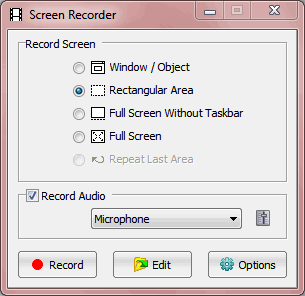
You could also use FastStone Capture as Screen Video Recorder. It could record Windows / Object, Rectangular Area, Full Screen Without Taskbar or Full Screen and save as WMV video files.
Note: Run FSCapture.exe to launch FastStone Capture Portable. FastStone Capture Portable 8.4 is the Unregistered Trial Version, you have 30 day trial.
FastStone Capture Portable 5.3 is the last Free Edition, it has five screen capture mode: Capture Active Window, Capture Window / Object, Capture Rectangel Region, Capture Freehand Region, Capture Full Region and Capture Scrolling Window.
What's new in FastStone Capture 8.4?
- Added support for high-DPI/high-resolution/4K monitors
- Added a tool called Screen Focus, which helps you stay focused on the task under the mouse pointer by dimming the rest of the screen
- Added an option to show file names to the output of the "Join Images Side by Side" tool
- Added "Adjust Lighting" to the Colors menu
- Enhanced the Resize tool so you can resize the image based on pixels or percentage
- Enhanced the Screen Color Picker
- Enhanced the "Acquire Images from Scanner" tool by allowing you to adjust the colors and lighting of scanned images
Download FastStone Capture
Developer: FastStone Capture Homepage
Password: www.thinstallsoft.com
Download FastStone Capture Portable 8.4 (30 Day Trial Version)
FastStoneCapturePortable_8.4_English.paf.exe (3.06 MB)
@ThinstallSoft.com | FastStone Capture Portable 8.4 Download Page | Old Versions | MD5 Hash
Download FastStone Capture Portable 5.3 (Free Version)
FastStone.Capture_ThinstallSoft.zip (1.19 MB)
@ThinstallSoft.com | FastStone Capture Portable 5.3 Download Page