NetWorx is a freeware Bandwidth monitor. It could collect bandwidth usage data and measure the speed of your Internet.
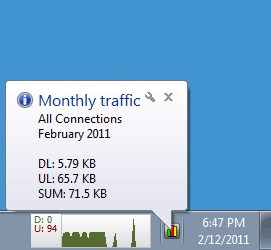
NetWorx monit traffice data of your bandwidth and generate daily, weekly or monthly report including received and sent data. NetWorx also allow you to export the report as *.xls, *.rtf, *.htm, *.txt or *.csv files.
NetWorx allows you to monitor all your network connections or a specific network connection (such as Ethernet or PPP) only and help you detect possible sources of network problems.
Note: Run networx.exe to launch NetWorx Portable. NetWorx Portable was updated to version 5.2.9 on 2013/7/29.
Features of NetWorx:
- Clear graphic and/or numeric display.
- Usage reports with export to a variety of file formats, including Excel, MS Word and HTML.
- Permits close supervision of uploads and downloads.
- Works with dial-up, ISDN, cable modems, ADSL, Ethernet cards, and more.
- Includes network information & testing tools with advanced netstat that displays applications using your Internet connection.
- Scalable to your own modem download capabilities.
- Option to notify user or disconnect from the Internet automatically when network activity exceeds a certain level.
- Speed meter to accurately time downloads and report the average transfer rates.
- Dial-up session journal with detailed information about every session.
- Absolutely free and does not contain any adware/spyware/malware.
What's new in NetWorx 5.2.9?
- More reliable uninstallation process to ensure no orphan files are left.
- Added a workaround to obtain application names that were previously recorded as unknown.
- Added deleting past records for applications from the Applications view.
- Expanded the default multicast IP address range to avoid recording multicast traffic as non-local.
- Updated LAN traffic filtering driver (now uses Windows Filtering Platform on Windows 7 and above).
Download NetWorx
Website: www.softperfect.com
Password: www.thinstallsoft.com
MD5 Hash: A77EFD6206173AE5E9B6EB742B4957A0
NetWorxPortable_32-bit_5.2.9.paf.exe | 1.31 MB
@ThinstallSoft.com | NetWorx Portable 5.2.9 (32-bit) Download Page | Old Versions
Download NetWorx Portable 5.2.9 (64-bit)
NetWorxPortable_64-bit_5.2.9.paf.exe | 1.55 MB
@ThinstallSoft.com | NetWorx Portable 5.2.9 (64-bit) Download Page