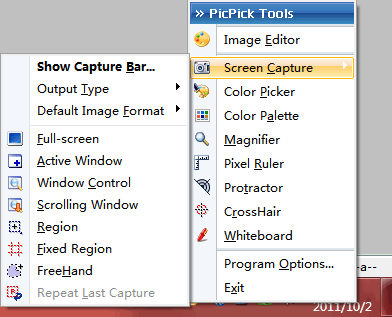
PicPick is a free and quality screen capture. It integrates the Screen Capture, Image Editor, Color Picker, Color Palette, Magnifier, Pixel Ruler, Protractor, CrossHair and Whiteborad together.
For Screen Capture, PicPick allows you to capture Full screen, Active Window, Window Control, Scrolling Window, Region, Fixed Region or FreeHand area. You could also repeat the last capture.
There is a Capture Bar in PicPick, this is rather convenient, you can quickly perform screen screen.

Features of PicPick Portable:
- For All Windows (Fully support Windows 7/8/10)
- Multi-language is supported.
- All functions are fully supported on a dual screen environment.
- No Registry, No access to System folder (you can copy these files to portable USB)
How to use PicPick Portable
Download the file PicPickPortable_5.1.2.paf.exe, unzip or unpack it, then run picpick.exe to launch the PicPick Portable v5.1.2.
What's new in PicPick Portable v5.1.2
- Fix an issue on multi monitor environment.
- Language updates.
Download PicPick Portable
Website: picpick.app
Password: www.thinstallsoft.com
MD5 Hash: 4F84D4CBCE13E7F73BD7D12872726460
Download PicPick Portable v5.1.2 (Free For Personal Use Only)
PicPickPortable_5.1.2.paf.exe (10.76 MB)
@ThinstallSoft.com | PicPick Portable 5.1.2 Download Page | Old Versions