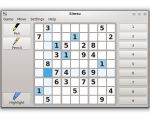
Simsu is a basic Sudoku game. You can switch between filling in notes (pencil mode), or filling in answers (pen mode).
To make it easier to see where to place numbers, you can highlight all instances of a number. You can also check your answers for correctness while playing. Simsu stores your current notes and answers, so that you can pick up where you left off the next time you play.

Download Simsu Portable
Website: gottcode.org
Password: www.thinstallsoft.com
MD5 Hash: unknown
Download Simsu Portable 1.2.1
Simsu.ThinstallSoft.7z | 3.74 MB
@ThinstallSoft.com | Simsu Portable 1.2.1 Download Page
Simsu.ThinstallSoft.7z | 3.74 MB
@ThinstallSoft.com | Simsu Portable 1.2.1 Download Page
End